

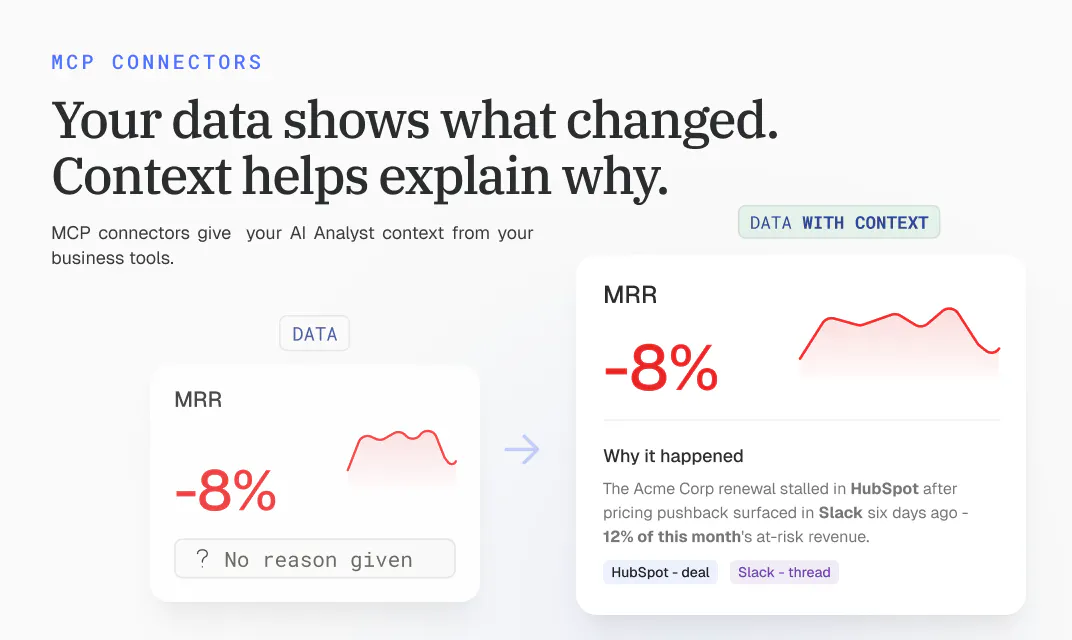
About MCP Connectors by Databox
Reviews 15
-
Burley Collins 1 month ago
#1 well deserved 🥇 giving the analyst context from crm + support is the usefull part. which connector gets used most?
-
Reilly Thiel 1 month ago
The per-tool approval settings are the part I’d want in any setup like this. Pulling context is one thing, but once an analyst can update a CRM or stop a campaign, “needs approval” can’t be an afterthought.
-
Marcus Macejkovic 1 month ago
"it can act on what it finds" is the line I'd want to poke at. explaining why a metric moved is read-only and low risk, but acting implies it's writing something back into the CRM or support desk, not just reading from it. what does that write path actually look like in practice, is it drafting a task for a human to approve, or can Genie create/update records in the connected tool directly without a person in the loop first?
-
Gilbert Lind 1 month ago
Good job, team! Since launch, I managed to setup full end-2-end workflows, leveraging data retrieval via @Langchain MCP, semantic analysis of the conversations and digesting the results in the datasets. Meanwhile, I put agents to work on daily/weekly routines for insights and anomaly tracking. Unlimited data-analysis-related use cases.
-
Halle Wilkinson 1 month ago
Bringing MCP connectors makes the “why behind the numbers” much more useful.
-
Odell Bode 1 month ago
Jakob, on the approval default: how does that work for a Routine running on a schedule, when nobody's in the chat to say OK? I run a few agents unattended on a Mac Mini and that's the case I'd worry about. A routine waiting on approval and a routine that found nothing to do look much the same from the outside, unless one of them says so.
-
Dorcas Parker 1 month ago
Congratulations on the launch! When the tools point to different reasons (say the CRM notes blame a legal review but a Slack thread blames pricing), does Genie show both explanations and let you judge, or does it pick the most likely one?
-
Jarrell Homenick 1 month ago
Nice, congratz! I work in support and from a technical perspective it's awesome that every connector ships with read AND write tools. Write is just turned off until permissions and oversight catch up. This is a cleaner path to v2 than adding support for write access after the fact
-
Enrico Wiza 1 month ago
We spent a good chunk of time on connector management, so seeing people use the permission settings is a nice payoff. My setup for Notion: read tools on Always allow, everything else on Needs approval. Fast for lookups, still asks before changing anything.
-
Marcus Macejkovic 1 month ago
Hey Peter, this is a great product. Congrats on the launch!
-
Sedrick Hirthe 1 month ago
Do you have mechanisms for provenance checking facts/numbers via some kind of multi-agent checks or "citing"? How do you make sure that there are no hallucinated results? (i assumed that this might be the problem you have, but depending on structure of your soft ig you might even avoid this entirely with retrieval-based approach over generated (AI just needed to find and point to smth in the data instead of "read and then rewrite in the return response") Congrats on the launch!!
-
Dejon Bergstrom 1 month ago
How did you prioritize which connectors to ship first, and what’s your bar for a connector being ‘good enough’ (tool granularity, auditability, token/tool-manifest size, reliability of OAuth/auth flows) versus leaving it to “bring your own MCP server”?
-
Johnathan Homenick 1 month ago
Looking real nice! So as I understand these are a set of MCP's that I can integrate in my workflow?
-
Korey Hammes 1 month ago
the number one question on demo calls is basically 'ok but does it actually know whats happening in our other tools'. now i can just say yes, connect hubspot or slack once and genie explains a number using whats actually in there. way easier sell than pointing at a roadmap slide
-
Esteban Kilback 1 month ago
Congratulations to the team, this one is well deserved! As one of the engineers that have been working on the MCP connectors I am most proud of the permission setup for every tool. This is a split point between trusting the ai with your crm and never actualy adopting ai at all and skipping the opportunities it brings.